
Parameterization
Many programming languages offer systems for writing generic or polymorphic code, which let you write code once, and generate efficient, specialized code at compile time.
Mojo's compile-time parameter system lets you define reusable code. A parameter
is a compile-time input to a struct or function. Parameters appear in square
brackets after the struct or function name. Parameters can take ordinary
values, like Int or String:
def multiplier[factor: Int](x: Int):
    return x * factor

def main():
    comptime times_ten = multiplier[10]
    x10 = times_ten(3)
Parameters accept both types and values at compile time. When a parameter accepts a type, the result is type-generic code. When it accepts a value, the result is value-generic code.
struct MyList[T: AnyType]:
    # ... type-generic

struct FixedBuffer[size: Int]:
    # ... value-generic
Mojo's parameters are similar to C++ template parameters or Rust generic parameters.
In Mojo, "parameter" always means a compile-time value, and "argument" always means a runtime value.
In most other languages, a parameter is part of a declaration and an argument is the value you pass at the call site. Mojo changes the meaning of "parameter" to refer specifically to compile-time values.
Mojo makes this distinction visible in syntax: use [] for
parameters and () for arguments.
In addition to parameterizing structs and functions, you can also define
parameterized comptime values.
Parameterized functions
To define a parameterized function, add parameters in square brackets ahead
of the argument list. Each parameter is formatted just like an argument: a
parameter name, followed by a colon and a type. In the
following example, the function has a single parameter, count of type Int.
def repeat[count: Int](msg: String):
    comptime for i in range(count):
        print(msg)
The comptime
keyword shown here
causes the for loop to be fully unrolled at compile time. The comptime for
requires the loop limits to be known at compile time. Since count is a
parameter, range(count) can be calculated at compile time.
Calling a parameterized function, you provide values for the parameters, just like function arguments:
repeat[3]("Hello")Hello
Hello
HelloThe compiler resolves the parameter values during compilation, and creates a
concrete version of the repeat[]() function for each unique parameter value.
After resolving the parameter values and unrolling the loop, the repeat[3]()
function would be roughly equivalent to this:
def repeat_3(msg: String):
    print(msg)
    print(msg)
print(msg)If the compiler can't resolve all parameter values to constant values, compilation fails.
Overloading on parameters
Functions and methods can be overloaded on their parameter signatures. For information on overload resolution, see Overloaded functions.
Parameters at a glance
Parameters to a function or struct appear in square brackets after a function or struct name. Parameters always require type annotations.
When you're looking at a function or struct signature, you may
see some special characters such as / and * in the parameter list.
Here's an example:
def my_sort[
    # infer-only parameters
    dtype: DType,
    width: Int,
    //,
    # positional-only parameter
    values: SIMD[dtype, width],
    /,
    # positional-or-keyword parameter
    compare: fn(Scalar[dtype], Scalar[dtype]) raises -> Int,
    *,
    # keyword-only parameter
    reverse: Bool = False,
]() -> SIMD[dtype, width]:
Here's a quick overview of the special characters in the parameter list:
- Double slash (
//): parameters declared before the double slash are infer-only parameters. - Slash (
/): parameters declared before a slash are positional-only parameters. Positional-only and keyword-only parameters follow the same rules as positional-only and keyword-only arguments. - A parameter name prefixed with a star, like
*Typesidentifies a variadic parameter (not shown in the example above). Any parameters following the variadic parameter are keyword-only. - Star (
*): in a parameter list with no variadic parameter, a star by itself indicates that the following parameters are keyword-only parameters. - An equals sign (
=) introduces a default value for an optional parameter.
Parameters and generics
Generics let functions work across multiple types, and let containers
store values of many types. For example,
List takes a type parameter, so
List[Int] holds integers and List[String] holds strings.
In Mojo, generics use compile-time parameters. A function parameterized
on a type is type-generic. A function parameterized on a value is
value-generic. Both use [].
This function uses both a type parameter and a value parameter:
def repeat[
    MsgType: Writable, // infer-only
    count: Int
](msg: MsgType):
    comptime for _ in range(count):
        print(msg)

def main() raises:
    repeat[2](42)  # prints 42 on two lines
MsgType is type-generic. It accepts any Writable type. count is
value-generic. It accepts a compile-time integer. Together, they let
you write one function that works across types and specializes for
different repeat counts.
MsgType uses // to mark it as an
infer-only parameter. The compiler infers
the type from msg, so you only pass count explicitly.
For more on generics—trait bounds, conditional conformance, and value generics—see generics.
Parameterized structs
You can also add parameters to structs. You can use parameterized structs to build generic collections. For example, a generic array type might include code like this:
struct GenericArray[ElementType: Copyable & ImplicitlyDestructible]:
    var data: UnsafePointer[Self.ElementType, MutExternalOrigin]
    var size: Int

    def __init__(out self, var *elements: Self.ElementType):
        self.size = len(elements)
        self.data = alloc[Self.ElementType](self.size)
        for i in range(self.size):
            (self.data + i).init_pointee_move(elements[i].copy())

    def __del__(deinit self):
        for i in range(self.size):
            (self.data + i).destroy_pointee()
        self.data.free()

    def __getitem__(self, i: Int) raises -> ref[self] Self.ElementType:
        if i < self.size:
            return self.data[i]
        else:
            raise Error("Out of bounds")
This struct has a single parameter, ElementType, which is a placeholder for
the data type you want to store in the array, sometimes called a type
parameter. ElementType conforms to the
Copyable trait and therefore to the
Movable trait.
As with parameterized functions, you need to pass in parameter values when you
use a parameterized struct. In this case, when you create an instance of
GenericArray, you need to specify the type you want to store, like Int, or
Float64. (This is a little confusing, because the parameter value you're
passing in this case is a type. That's OK: a Mojo type is a valid compile-time
value.)
You'll see that Self.ElementType is used throughout the struct where you'd
usually see a type name. For example, as the formal type for the elements in
the constructor, and the return type of the __getitem__() method.
Here's an example of using GenericArray:
var array = GenericArray(1, 2, 3, 4)
for i in range(array.size):
    end = ", " if i < array.size - 1 else "\n"
    print(array[i], end=end)
1, 2, 3, 4A parameterized struct can use the Self type to represent a concrete instance
of the struct (that is, with all its parameters specified). For example, you
could add a static factory method to GenericArray with the following
signature:
struct GenericArray[ElementType: Copyable & ImplicitlyDestructible]:
    ...

    @staticmethod
    def splat(count: Int, value: Self.ElementType) -> Self:
        # Create a new array with count instances of the given value
Here, Self is equivalent to writing GenericArray[Self.ElementType]. That is,
you can call the splat() method like this:
GenericArray[Float64].splat(8, 0)The method returns an instance of GenericArray[Float64].
Referencing struct parameters
As shown in the previous section, you reference a
struct parameter using dot syntax, just like a struct method or field (for
example, Self.ElementType).
This struct parameter access works anywhere, not just inside a struct's methods. You can access parameters as attributes on the type itself:
def on_type():
    print(SIMD[DType.float32, 2].size)  # prints 2
Or as attributes on an instance of the type:
def on_instance():
    var x = SIMD[DType.int32, 2](4, 8)
    print(x.dtype)  # prints int32
comptime members
You can also define comptime values as members of a struct or trait
declaration:
struct Circle[radius: Float64]:
    comptime pi = 3.14159265359
    comptime circumference = 2 * Self.pi * Self.radius
These comptime members have a number of uses:
- Constant values specific to the type.
- Constant values calculated based on the struct's parameters.
- Associated types based on the struct's parameters.
The difference between parameters and comptime members is that parameter
values are specified by the user, but comptime members represent either
constant values or values derived from the input parameters.
A trait can declare a comptime member, which must be defined by all conforming
structs.
Referencing comptime members works just like referencing struct parameters—you
can reference a member using dot syntax (such as Self.IteratorType).
comptime members as enumerations
Some Mojo types use comptime members to express enumerations. For example, the
following code defines a Sentiment type that defines comptime constants
for different sentiment values:
@fieldwise_init
struct Sentiment(Equatable, ImplicitlyCopyable):
    var _value: Int

    comptime NEGATIVE = Sentiment(0)
    comptime NEUTRAL = Sentiment(1)
    comptime POSITIVE = Sentiment(2)

    def __eq__(self, other: Self) -> Bool:
        return self._value == other._value

    def __ne__(self, other: Self) -> Bool:
        return not (self == other)

def is_happy(s: Sentiment):
    if s == Sentiment.POSITIVE:
        print("Yes. 😀")
    else:
        print("No. ☹️")
This pattern provides a type-safe enumeration.
The DType struct implements a simple enum
using comptime members like this. This allows clients to use values like
DType.float32 in parameter expressions or runtime expressions.
comptime members as associated types
Associated types are a common use for comptime members. For example, a
List[T] struct holds values of type T. The list's __iter__() method
returns a list iterator that returns values of type T. List uses a
comptime member, IteratorType, to define the type of the returned iterator.
The following code excerpt shows a simplified version of some of the List
code, showing the List and its associated IteratorType:
@fieldwise_init
struct _ListIter[
    mut: Bool,
    //,
    T: Copyable,
    origin: Origin[mut],
](ImplicitlyCopyable, Iterable, Iterator):

    comptime Element = Self.T  # Required by the Iterator trait

    var index: Int
    var src: Pointer[List[Self.Element], Self.origin]

    # ... implementation omitted

struct List[T: Copyable](
    Boolable, Copyable, Defaultable, Iterable, Sized
):
    comptime IteratorType[
        iterable_mut: Bool, //, iterable_origin: Origin[iterable_mut]
    ]: Iterator = _ListIter[Self.T, iterable_origin]

    # ... code omitted

    def __iter__(ref self) -> Self.IteratorType[origin_of(self)]:
        return {0, Pointer(to=self)}

    # ... code omitted
The IteratorType member is parameterized on an origin, so it can
represent both mutable and immutable iterators.
Struct methods
A struct's method can take its own parameters. For example, the SIMD.slice()
method takes a size parameter:
var m = SIMD[DType.int32](1, 3, 5, 7)
var n = m.slice[2]()
print(n)  # prints [1, 3]
A struct's lifecycle methods (__init__() and __del__()) are an exception to
this rule—they can't take parameters.
Case study: the SIMD type
For a real-world example of a parameterized type, let's look at the
SIMD type from Mojo's standard library.
Single instruction, multiple data (SIMD) is a parallel processing technology built into many modern CPUs, GPUs, and custom accelerators. SIMD allows you to perform a single operation on multiple pieces of data at once. For example, if you want to take the square root of each element in an array, you can use SIMD to parallelize the work.
Processors implement SIMD using low-level vector registers in hardware that hold multiple instances of a scalar data type. To use the SIMD instructions on these processors, the data must be shaped into the proper SIMD width (data type) and length (vector size). Processors may support 512-bit or longer SIMD vectors, and support many data types from 8-bit integers to 64-bit floating point numbers, so it's not practical to define all of the possible SIMD variations.
Mojo's SIMD type (defined as a struct)
exposes the common SIMD operations through its methods, and takes the SIMD data
type and size values as parameters. This allows you to directly map your data to
the SIMD vectors on any hardware.
Here's a cut-down (non-functional) version of Mojo's SIMD type definition:
struct SIMD[dtype: DType, size: Int]:
    var value: … # Some low-level MLIR stuff here

    # Create a new SIMD from a number of scalars
    def __init__(out self, *elems: SIMD[Self.dtype, 1]):  ...

    # Fill a SIMD with a duplicated scalar value.
    @staticmethod
    def splat(x: SIMD[Self.dtype, 1]) -> SIMD[Self.dtype, Self.size]: ...

    # Cast the elements of the SIMD to a different elt type.
    def cast[target: DType](self) -> SIMD[target, Self.size]: ...

    # Many standard operators are supported.
    def __add__(self, rhs: Self) -> Self: ...
So you can create and use a SIMD vector like this:
var vector = SIMD[DType.int16, 4](1, 2, 3, 4)
vector = vector * vector
for i in range(4):
    print(vector[i], end=" ")
1 4 9 16As you can see, a simple arithmetic operator like * applied to a pair of
SIMD vector operates on the corresponding elements in each vector.
Defining each SIMD variant with parameters is great for code reuse because the
SIMD type can express all the different vector variants statically, instead of
requiring the language to pre-define every variant.
Because SIMD is a parameterized type, the self argument in its functions
carries those parameters—the full type name is SIMD[type, size]. Although
it's valid to write this out (as shown in the return type of splat()), this
can be verbose, so we recommend using the Self type (from
PEP673) like the __add__ example does.
Using parameterized types and functions
You can use parameterized types and functions by passing values to the
parameters in square brackets. For example, for the SIMD type above, dtype
specifies the data type and size specifies the length of the SIMD vector
(which must be a power of 2):
def main() raises:
    # Make a vector of 4 floats.
    var small_vec = SIMD[DType.float32, 4](1.0, 2.0, 3.0, 4.0)

    # Make a big vector containing 1.0 in float16 format.
    var big_vec = SIMD[DType.float16, 32](1.0)

    # Do some math and convert the elements to float32.
    var bigger_vec = (big_vec + big_vec).cast[DType.float32]()

    # You can write types out explicitly if you want of course.
    var bigger_vec2: SIMD[DType.float32, 32] = bigger_vec

    print("small_vec DType:", small_vec.dtype, "size:", small_vec.size)
    print(
        "bigger_vec2 DType:",
        bigger_vec2.dtype,
        "size:",
        bigger_vec2.size,
    )
small_vec DType: float32 size: 4
bigger_vec2 DType: float32 size: 32Note that the cast() method also needs a parameter to specify the type you
want from the cast (the method definition above expects a target parameter
value). Thus, just as the SIMD struct is a generic type definition, the
cast() method is a generic method definition. At compile time, the compiler
creates a concrete version of the cast() method with the target parameter
bound to DType.float32.
The code above shows the use of concrete types (that is, the parameters are all
bound to known values). But the major power of parameters comes from the ability
to define parameterized algorithms and types (code that uses the parameter
values). For example, here's how to define a parameterized algorithm with
Scalar that is datatype agnostic:
from std.math import sqrt

def rsqrt[dt: DType](x: Scalar[dt]) -> Scalar[dt]:
    return 1 / sqrt(x)

def main() raises:
    var v = Scalar[DType.float16](42)
print(rsqrt(v))0.154296875Parameter inference
The Mojo compiler can often infer parameter values, so you don't always have
to specify them. For example, in the previous section, this is how we called
the parameterized rsqrt() function:
var v = Scalar[DType.float16](42)
print(rsqrt(v))
The compiler infers the dt parameter based on the type of the v
value passed into it, as if you wrote rsqrt[DType.float16](v) explicitly.
Figure 1 shows a mental model for how parameter inference works.
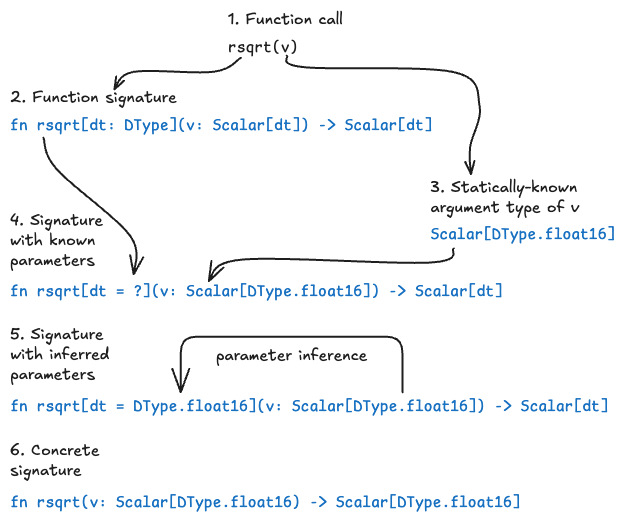
Parameter inference can seem a little confusing: it might seem like the compiler is inferring compile-time parameter values from run-time argument values. But in fact it's inferring parameters from the statically-known types of the arguments.
Mojo can also infer the values of struct parameters from the arguments passed to a constructor or static method.
For example, consider the following struct:
struct One[Type: Writable & Copyable]:
    var value: Self.Type

    def __init__(out self, value: Self.Type):
        self.value = value.copy()


def use_one() raises:
    s1 = One(123)  # equivalent to One[Int](123)
    s2 = One("Hello")  # equivalent to One[String]("Hello")
Note that you can create an instance of One without specifying the Type
parameter—Mojo can infer it from the value argument.
You can also infer parameters from a parameterized type passed to a constructor or static method:
struct Two[Type: Writable & Copyable]:
    var val1: Self.Type
    var val2: Self.Type

    def __init__(out self, one: One[Self.Type], another: One[Self.Type]):
        self.val1 = one.value.copy()
        self.val2 = another.value.copy()
        print(String(self.val1), String(self.val2))

    @staticmethod
    def fire(thing1: One[Self.Type], thing2: One[Self.Type]):
        print("🔥", String(thing1.value), String(thing2.value))

def use_two() raises:
    s3 = Two(One("infer"), One("me"))
    Two.fire(One(1), One(2))
    # Two.fire(One("mixed"), One(0)) # Error: parameter inferred to two
                                     # different values

use_two()
infer me
🔥 1 2Two takes a Type parameter, and its constructor takes values of type
One[Type]. When constructing an instance of Two, you don't need to specify
the Type parameter, since it can be inferred from the arguments.
Similarly, the static fire() method takes values of type One[Type], so Mojo
can infer the Type value at compile time. Note that passing two instances of
One with different types doesn't work.
Parameter declarations
When you declare parameters on a struct or function, you have many of the same options as you have with arguments—you can define optional parameters with default values; keyword-only parameters; and variadic parameters.
In addition, you can define infer-only parameters, which provide a flexible way of defining dependencies between parameterized types.
Optional parameters and keyword parameters
Just as you can specify optional arguments in function signatures, you can also define an optional parameter by giving it a default value.
You can also pass parameters by keyword, just like you can use keyword arguments. For a function or struct with multiple optional parameters, using keywords allows you to pass only the parameters you want to specify, regardless of their position in the function signature.
For example, here's a function with two parameters, each with a default value:
def speak[a: Int = 3, msg: String = "woof"]():
    print(msg, a)


def use_defaults():
    speak()  # prints 'woof 3'
    speak[5]()  # prints 'woof 5'
    speak[7, "meow"]()  # prints 'meow 7'
    speak[msg="baaa"]()  # prints 'baaa 3'
Recall that when a parameterized function is called, Mojo can infer the parameter values. That is, it can determine its parameter values from the parameters attached to an argument. If the parameterized function also has a default value defined, then the inferred parameter value takes precedence.
For example, in the following code, we update the parameterized speak[]()
function to take an argument with a parameterized type. Although the function
has a default parameter value for a, Mojo instead uses the inferred a
parameter value from the bar argument (as written, the default a value can
never be used, but this is just for demonstration purposes):
@fieldwise_init
struct Bar[v: Int]:
    pass


def speak[a: Int = 3, msg: String = "woof"](bar: Bar[a]):
    print(msg, a)


def use_inferred():
    speak(Bar[9]())  # prints 'woof 9'
As mentioned above, you can also use optional parameters and keyword parameters in a struct:
struct KwParamStruct[greeting: String = "Hello", name: String = "🔥mojo🔥"]:
    def __init__(out self):
        print(Self.greeting, Self.name)

def use_kw_params():
    var a = KwParamStruct[]()                 # prints 'Hello 🔥mojo🔥'
    var b = KwParamStruct[name="World"]()     # prints 'Hello World'
var c = KwParamStruct[greeting="Hola"]() # prints 'Hola 🔥mojo🔥'Variadic parameters
Mojo also supports variadic parameters, similar to Variadic arguments:
struct MyTensor[*dimensions: Int]:
    pass
Variadic parameters currently have some limitations that variadic arguments don't have:
-
Variadic parameters must be homogeneous—that is, all the values must be the same type.
-
The parameter type must be register-passable.
-
The parameter values aren't automatically projected into a list, so you need to construct the list (in this case, a
VariadicParamList) explicitly:def sum_params[*values: Int]() -> Int: comptime list = VariadicParamList[*values]() var sum = 0 for v in list: sum += v return sum
Variadic keyword parameters (for example, **kwparams) are
not supported yet.
Infer-only parameters
Sometimes you need to declare functions where parameters depend on other parameters. Because the signature is processed left to right, a parameter can only depend on a parameter earlier in the parameter list. For example:
def dependent_type[dtype: DType, value: Scalar[dtype]]():
    print("Value: ", value)
    print("Value is floating-point: ", dtype.is_floating_point())

dependent_type[DType.float64, Float64(2.2)]()
Value: 2.2000000000000002
Value is floating-point: TrueYou can't reverse the position of the dtype and value parameters, because
value depends on dtype. However, because dtype is a required parameter,
you can't leave it out of the parameter list and let Mojo infer it from value:
dependent_type[Float64(2.2)]() # Error!Infer-only parameters are a special class of parameters that are always
either inferred from context or specified by keyword. Infer-only parameters are
placed at the beginning of the parameter list, set off from other parameters
by the // sigil:
def example[T: Copyable, //, list: List[T]]()Transforming dtype into an infer-only parameter solves this problem:
def dependent_type[dtype: DType, //, value: Scalar[dtype]]():
    print("Value: ", value)
    print("Value is floating-point: ", dtype.is_floating_point())

dependent_type[Float64(2.2)]()
Value: 2.2000000000000002
Value is floating-point: TrueBecause infer-only parameters are declared at the beginning of the parameter list, other parameters can depend on them, and the compiler will always attempt to infer the infer-only values from bound parameters or arguments.
There are sometimes cases where it's useful to specify an infer-only parameter
by keyword. For example, the
Span type
is parameterized on origin:
struct Span[mut: Bool, //, T: Copyable, origin: Origin[mut]]:
    # ... implementation omitted
Here, the mut parameter is infer-only. The value is usually inferred when you
create an instance of Span. Binding the mut parameter by keyword lets you
define a Span that requires a mutable origin.
def mutate_span(span: Span[mut=True, Byte, ...]) raises:
    for i in range(0, len(span), 2):
        if i + 1 < len(span):
            span.swap_elements(i, i + 1)
If the compiler can't infer the value of an infer-only parameter, and it's not specified by keyword, compilation fails.
Parameter expressions are just Mojo code
A parameter expression is any code expression (such as a+b) that occurs where
a parameter is expected. Parameter expressions support operators and function
calls, just like runtime code, and all parameter types use the same type
system as the runtime program (such as Int and DType).
Because parameter expressions use the same grammar and types as runtime Mojo code, you can use many "dependent type" features. For example, you might want to define a helper function to concatenate two SIMD vectors:
def concat[
    dtype: DType, ls_size: Int, rh_size: Int, //
](lhs: SIMD[dtype, ls_size], rhs: SIMD[dtype, rh_size]) -> SIMD[
    dtype, ls_size + rh_size
]:
    var result = SIMD[dtype, ls_size + rh_size]()

    comptime for i in range(ls_size):
        result[i] = lhs[i]

    comptime for j in range(rh_size):
        result[ls_size + j] = rhs[j]
    return result
Note that the resulting length is the sum of the input vector lengths, and this
is expressed with a simple + operation.
Powerful compile-time programming
While simple expressions are useful, sometimes you want to write imperative compile-time logic with control flow. You can even do compile-time recursion. For instance, here is an example "tree reduction" algorithm that sums all elements of a vector recursively into a scalar:
def slice[
    dtype: DType, size: Int, //
](x: SIMD[dtype, size], offset: Int) -> SIMD[dtype, size // 2]:
    comptime new_size = size // 2
    var result = SIMD[dtype, new_size]()
    for i in range(new_size):
        result[i] = SIMD[dtype, 1](x[i + offset])
    return result


def reduce_add(x: SIMD) -> Int:
    comptime if x.size == 1:
        return Int(x[0])
    elif x.size == 2:
        return Int(x[0]) + Int(x[1])

    # Extract the top/bottom halves, add them, sum the elements.
    comptime half_size = x.size // 2
    var lhs = slice(x, 0)
    var rhs = slice(x, half_size)
    return reduce_add(lhs + rhs)


def main() raises:
    var x = SIMD[DType.int, 4](1, 2, 3, 4)
    print(x)
    print("Elements sum:", reduce_add(x))
[1, 2, 3, 4]
Elements sum: 10This makes use of the
comptime if
statement, which is an if statement that runs at compile-time. It requires
that its condition be a valid parameter expression, and ensures that only the
live branch of the if statement is compiled into the program. This is similar
to use of the comptime for loop shown earlier.
Parameterized comptime values
A parameterized comptime value is a compile-time expression that takes a
list of parameters and returns a compile-time constant value:
comptime AddOne[a: Int] : Int = a + 1

comptime nine = AddOne[8]
As you can see in the previous example, a parameterized comptime value is a
little like a compile-time-only function. A regular function or method can
also be invoked at compile time:
def add_one(a: Int) -> Int:
    return a + 1

comptime ten = add_one(9)
A major difference between a function and a parameterized comptime value is
that the value of a comptime expression can be a type, while a function can't
return a type as a value.
# Does not work—-dynamic type values not permitted
def int_type() -> AnyType:
    return Int

# Works
comptime IntType = Int
Because a comptime value can be a type, you can use parameterized comptime
values to express new types:
comptime TwoOfAKind[dt: DType] = SIMD[dt, 2]
twoFloats = TwoOfAKind[DType.float32](1.0, 2.0)

comptime StringKeyDict[ValueType: Copyable & ImplicitlyDestructible] = Dict[String, ValueType]
var b: StringKeyDict[UInt8] = {"answer": 42}
Parameterized comptime declarations support the same features as parameterized
structs or functions: infer-only parameters, keyword-only and optional
parameters, automatic parameterization, and so
on.
def main():
    comptime Floats[size: Int, half_width: Bool = False] = SIMD[
        (DType.float16 if half_width else DType.float32), size
    ]
    var floats = Floats[2](6.0, 8.0)
    var half_floats = Floats[2, True](10.0, 12.0)
Fully-bound, partially-bound, and unbound types
A parameterized type with its parameters specified is said to be fully-bound. That is, all of its parameters are bound to values. As mentioned before, you can only instantiate a fully-bound type (sometimes called a concrete type).
However, parameterized types can be unbound or partially bound in some
contexts. For example, you can use comptime to create a type alias to a
partially-bound type to create a new type that requires fewer parameters:
comptime StringKeyDict = Dict[String, _]
var b: StringKeyDict[UInt8] = {"answer": 42}
Here, StringKeyDict is a type alias for a Dict that takes String keys. The
underscore _ in the parameter list indicates that the second parameter,
V (the value type), is unbound.
You specify the V parameter later, when you use StringKeyDict.
You can also use partially-bound types as the type bound for an argument or parameter.
For example, given the following type:
struct MyType[s: String, i: Int, i2: Int, b: Bool = True]:
    pass
It can appear in code in the following forms:
-
Fully bound, with all of its parameters specified:
def my_fn1(m1: MyType["Hello", 3, 4, True]) raises: pass -
Partially bound, with some but not all of its parameters specified:
def my_fn2(m2: MyType["Hola", _, _, True]) raises: pass -
Unbound, with no parameters specified:
def my_fn3(m3: MyType[_, _, _, _]) raises:
    pass
You can also use three dots (...) to unbind an arbitrary
number of parameters at the end of a parameter list (including any
keyword-only parameters):
# These two types are equivalent
MyType["Hello", ...]
MyType["Hello", _, _, _]
When a parameter is explicitly unbound with the _, or ... expressions,
you must specify a value for that parameter to use the type.
The default values of explicitly unbound parameters are ignored.
Partially-bound and unbound parameterized types can be used in some contexts
where the missing (unbound) parameters will be supplied later—such as in
comptime values
and automatically parameterized functions.
Omitted parameters
Mojo also supports an alternate format for unbound parameters where parameters are simply omitted from the expression:
@fieldwise_init
struct MyComplicatedType[a: Int = 7, /, b: Int = 8, *, c: Int, d: Int = 9]:
    pass

# Unbound
def my_func(t: MyComplicatedType):
    pass
This is equivalent to def my_func(t: MyComplicatedType[...]): pass.
That is, all parameters (positional-only, positional-or-keyword, keyword-only)
are unbound and their default values (if any) ignored.
Note that when an argument type is partially bound, default values will be bound:
# Partially bound
MyComplicatedType[1]
# Equivalent to
MyComplicatedType[1, 8, c=_, d=9] # Uses default values for `b` and `d`.Automatic parameterization
Mojo supports "automatic" parameterization of functions and parameterized
comptime values. If a function argument type or parameter type is
partially-bound or unbound,
the unbound parameters are automatically added as parameters on the
function. This is easier to understand with an example:
def print_params(vec: SIMD):
    print(vec.dtype)
    print(vec.size)

var v = SIMD[DType.float64, 4](1.0, 2.0, 3.0, 4.0)
print_params(v)
float64
4In the above example, the print_params() function is automatically
parameterized. The vec argument takes an argument of type SIMD[...]. This is
an unbound parameterized
type—that is, it doesn't
specify any parameter values for the type. Mojo treats the unbound parameters
on vec as infer-only parameters on the function. This is roughly equivalent to
the following code:
def print_params2[t: DType, s: Int, //](vec: SIMD[t, s]):
    print(vec.dtype)
    print(vec.size)
When you call print_params() you must pass it a concrete instance of the
SIMD type—that is, one with all of its parameters specified, like
SIMD[DType.float64, 4]. The Mojo compiler infers the parameter
values from the input argument.
With a manually parameterized function, you can access the parameters by
name (for example, t and s in the previous example), which is not an option
in an automatically parameterized function.
However, you can always access a type's parameters and comptime members using
dot syntax (for example, vec.dtype), as described in
Referencing struct parameters.
This ability to access a type's parameters and comptime members is not
specific to automatically parameterized functions, you can use it anywhere.
You can even use this syntax in the function's signature to define a
function's arguments and return type based on an argument's parameters or
comptime members.
For example, if you want your function to take two SIMD vectors with the same type and size, you can write code like this:
def main():
    def interleave(v1: SIMD, v2: type_of(v1)) -> SIMD[v1.dtype, v1.size*2]:
        var result = SIMD[v1.dtype, v1.size*2]()
        for i in range(v1.size):
            result[i*2] = v1[i]
            result[i*2+1] = v2[i]
        return result

    var a = SIMD[DType.int16, 4](1, 2, 3, 4)
    var b = SIMD[DType.int16, 4](0, 0, 0, 0)
    var c = interleave(a, b)
    print(c)  # [1, 0, 2, 0, 3, 0, 4, 0]
As shown in the example, you can use the magic type_of(x) call if you just
want to match the type of an argument. In this case, it's more convenient and
compact than writing the equivalent SIMD[v1.dtype, v1.size].
Automatic parameterization of parameters
You can also take advantage of automatic parameterization in the parameter list
of a function or parameterized comptime value. For example:
def foo[value: SIMD]():
    pass

# Equivalent to:
def foo[dtype: DType, size: Int, //, value: SIMD[dtype, size]]():
    pass
Here's another example using a parameterized comptime value:
comptime Foo[S: SIMD] = Bar[S]

# Equivalent to:
comptime Foo[dtype: DType, size: Int, //, S: SIMD[dtype, size]] = Bar[S]
Automatic parameterization with partially-bound types
Mojo also supports automatic parameterization: with partially-bound parameterized types (that is, types with some but not all of the parameters specified).
For example, suppose we have a Fudge struct with three parameters:
@fieldwise_init
struct Fudge[sugar: Int, cream: Int, chocolate: Int = 7](Writable):
    pass
We can write a function that takes a Fudge argument with just one bound
parameter (it's partially bound):
def eat(f: Fudge[5, ...]):
    print("Ate " + String(f))
The eat() function takes a Fudge struct with the first parameter (sugar)
bound to the value 5. The second and third parameters, cream and chocolate
are unbound.
The unbound cream and chocolate parameters become implicit parameters
on the eat function. In practice, this is roughly equivalent to writing:
def eat[cr: Int, ch: Int](f: Fudge[5, cr, ch]):
    print("Ate", String(f))
In both cases, we can call the function by passing in an instance with the
cream and chocolate parameters bound:
eat(Fudge[5, 5, 7]())
eat(Fudge[5, 8, 9]())
Ate Fudge (5,5,7)
Ate Fudge (5,8,9)If you try to pass in an argument with a sugar value other than 5,
compilation fails, because it doesn't match the argument type:
eat(Fudge[12, 5, 7]())
# ERROR: invalid call to 'eat': argument #0 cannot be converted from 'Fudge[12, 5, 7]' to 'Fudge[5, 5, 7]'
You can also explicitly unbind individual parameters. This gives you more freedom in specifying unbound parameters.
For example, you might want to let the user specify values for sugar and
chocolate, and leave cream constant. To do this, replace each unbound
parameter value with a single underscore (_):
def devour(f: Fudge[_, 6, _]):
    print("Devoured",  String(f))
Again, the unbound parameters (sugar and chocolate) are added as implicit
parameters on the function. This version is roughly equivalent to the
following code, where these two values are explicitly bound to the input
parameters, su and ch:
def devour[su: Int, ch: Int](f: Fudge[su, 6, ch]):
    print("Devoured", String(f))
You can also specify parameters by keyword, or mix positional and keyword
parameters, so the following function is roughly equivalent to the previous one:
the first parameter, sugar is explicitly unbound with the underscore
character. The chocolate parameter is unbound using the keyword syntax,
chocolate=_. And cream is explicitly bound to the value 6:
def devour(f: Fudge[_, chocolate=_, cream=6]):
    print("Devoured", String(f))
All three versions of the devour() function work with the following calls:
devour(Fudge[3, 6, 9]())
devour(Fudge[4, 6, 8]())
Devoured Fudge (3,6,9)
Devoured Fudge (4,6,8)The rebind() builtin
One of the consequences of Mojo not performing function instantiation in the parser like C++ is that Mojo cannot always figure out whether some parameterized types are equal and complain about an invalid conversion. This typically occurs in static dispatch patterns. For example, the following code won't compile:
def take_simd8(x: SIMD[DType.float32, 8]):
    pass

def generic_simd[nelts: Int](x: SIMD[DType.float32, nelts]):
    comptime if nelts == 8:
        take_simd8(x)
The parser will complain:
error: invalid call to 'take_simd8': argument #0 cannot be converted from
'SIMD[f32, nelts]' to 'SIMD[f32, 8]'
        take_simd8(x)
        ~~~~~~~~~~^~~
This is because the parser fully type-checks the function without instantiation,
and the type of x is still SIMD[f32, nelts], and not SIMD[f32, 8], despite
the static conditional. The remedy is to manually "rebind" the type of x,
using the rebind builtin, which inserts a compile-time assert that the input
and result types resolve to the same type after function instantiation:
def take_simd8(x: SIMD[DType.float32, 8]):
    pass

def generic_simd[nelts: Int](x: SIMD[DType.float32, nelts]):
    comptime if nelts == 8:
        take_simd8(rebind[SIMD[DType.float32, 8]](x))
Was this page helpful?
Thank you! We'll create more content like this.
Thank you for helping us improve!