
For the complete documentation index, see llms.txt. Markdown versions of all pages are available by appending .md to any URL (e.g. /get-started.md).
GPU programming fundamentals
This guide explores the fundamentals of GPU programming using the Mojo programming language, covering essential concepts and techniques for developing GPU-accelerated applications that can work on a variety of supported GPUs from different vendors.
Key topics covered in this guide:
- Understanding the CPU-GPU programming model.
- Working with Mojo's GPU support through the MAX accelerator library.
- Managing GPU devices and contexts using
DeviceContext. - Writing and executing kernel functions for parallel computation.
- Memory management and data transfer between CPU and GPU.
- Organizing threads and thread blocks for optimal performance.
Before diving into GPU programming, ensure you have a compatible GPU and the necessary development environment installed. And if you're new to GPU programming, we suggest you read the Intro to GPU architectures.
Overview of GPU programming in Mojo
The Mojo language, together with the open source MAX accelerator library, allows you to develop GPU-enabled applications.
GPU support in the MAX accelerator library
The max.gpu package of the MAX accelerator library
includes several subpackages for interacting with GPUs, with the
max.gpu.host package providing most of the commonly
used APIs. A few APIs that you use inside kernel functions—such as the thread
and block indices—remain in the Mojo standard library's
gpu package. And the standard library's
sys package contains a few basic
introspection functions for determining whether a system has a supported GPU:
has_accelerator(): ReturnsTrueif the host system has an accelerator andFalseotherwise.has_amd_gpu_accelerator(): ReturnsTrueif the host system has an AMD GPU andFalseotherwise.has_apple_gpu_accelerator(): ReturnsTrueif the host system has an Apple silicon GPU andFalseotherwise.has_nvidia_gpu_accelerator(): ReturnsTrueif the host system has an NVIDIA GPU andFalseotherwise.
These functions are useful for conditional compilation or execution depending on whether a supported GPU is available.
from std.sys import has_accelerator


def main():
    comptime if has_accelerator():
        print("GPU detected")
        # Enable GPU processing
    else:
        print("No GPU detected")
# Print error or fall back to CPU-only executionGPU programming model
GPU programming follows a distinct pattern where work is divided between the CPU and GPU:
- The CPU (host) manages program flow and coordinates GPU operations.
- The GPU (device) executes parallel computations across many threads.
- You must explicitly manage data exchange between host and device memory.
A GPU program generally follows these steps:
- Initialize data in host (CPU) memory.
- Allocate device (GPU) memory and transfer data from host to device memory.
- Execute a kernel function on the GPU to process the data.
- Transfer results back from device to host memory.
This process typically runs asynchronously, allowing the CPU to perform other tasks while the GPU processes data. Any time that the CPU needs to ensure that the GPU has completed an operation, such as before it copies kernel results from device memory, it must first explicitly synchronize with the GPU as described in Asynchronous operation and synchronizing the CPU and GPU.
A simple example helps to understand this programming model. We'll not go into detail about the specific APIs at this point other than the included comments, but all of the types, functions, and methods are discussed in more detail in later sections of this document.
from std.math import iota
from std.sys import exit, has_accelerator

from max.gpu.host import DeviceContext
from std.gpu import block_dim, block_idx, thread_idx

comptime num_elements = 20


def scalar_add(
    vector: UnsafePointer[Float32, MutAnyOrigin], size: Int32, scalar: Float32
):
    """
    Kernel function to add a scalar to all elements of a vector.

    This kernel function adds a scalar value to each element of a vector stored
    in GPU memory. The input vector is modified in place.

    Args:
        vector: Pointer to the input vector.
        size: Number of elements in the vector.
        scalar: Scalar to add to the vector.

    """

    # Calculate the global thread index within the entire grid. Each thread
    # processes one element of the vector.
    #
    # block_idx.x: index of the current thread block.
    # block_dim.x: number of threads per block.
    # thread_idx.x: index of the current thread within its block.
    idx = block_idx.x * block_dim.x + thread_idx.x

    # Bounds checking: ensure we don't access memory beyond the vector size.
    # This is crucial when the number of threads doesn't exactly match vector
    # size.
    if idx < Int(size):
        # Each thread adds the scalar to its corresponding vector element
        # This operation happens in parallel across all GPU threads
        vector[unsafe_offset=idx] += scalar


def main() raises:
    comptime if not has_accelerator():
        print("No GPUs detected")
        exit(0)
    else:
        # Initialize GPU context for device 0 (default GPU device).
        ctx = DeviceContext()

        # Create a buffer in host (CPU) memory to store our input data
        host_buffer = ctx.enqueue_create_host_buffer[DType.float32](
            num_elements
        )

        # Wait for buffer creation to complete.
        ctx.synchronize()

        # Fill the host buffer with sequential numbers (0, 1, 2, ..., size-1).
        iota(host_buffer.as_span())
        print("Original host buffer:", host_buffer)

        # Create a buffer in device (GPU) memory to store data for computation.
        device_buffer = ctx.enqueue_create_buffer[DType.float32](num_elements)

        # Copy data from host memory to device memory for GPU processing.
        ctx.enqueue_copy(src_buf=host_buffer, dst_buf=device_buffer)

        # Compile the scalar_add kernel function for execution on the GPU.
        scalar_add_kernel = ctx.compile_function[scalar_add]()

        # Launch the GPU kernel with the following arguments:
        #
        # - device_buffer: GPU memory containing our vector data
        # - num_elements: number of elements in the vector
        # - Float32(20.0): the scalar value to add to each element
        # - grid_dim=1: use 1 thread block
        # - block_dim=num_elements: use 'num_elements' threads per block (one
        #   thread per vector element)
        ctx.enqueue_function(
            scalar_add_kernel,
            device_buffer,
            num_elements,
            Float32(20.0),
            grid_dim=1,
            block_dim=num_elements,
        )

        # Copy the computed results back from device memory to host memory.
        ctx.enqueue_copy(src_buf=device_buffer, dst_buf=host_buffer)

        # Wait for all GPU operations to complete.
        ctx.synchronize()

        # Display the final results after GPU computation.
        print("Modified host buffer:", host_buffer)
This application produces the following output:
Original host buffer: HostBuffer([0.0, 1.0, 2.0, 3.0, 4.0, 5.0, 6.0, 7.0, 8.0, 9.0, 10.0, 11.0, 12.0, 13.0, 14.0, 15.0, 16.0, 17.0, 18.0, 19.0])
Modified host buffer: HostBuffer([20.0, 21.0, 22.0, 23.0, 24.0, 25.0, 26.0, 27.0, 28.0, 29.0, 30.0, 31.0, 32.0, 33.0, 34.0, 35.0, 36.0, 37.0, 38.0, 39.0])
Accessing and managing GPUs with DeviceContext
The max.gpu.host package includes the
DeviceContext
struct, which represents a logical instance of a GPU device. It provides methods
for allocating memory on the device, copying data between the host CPU and the
GPU, and compiling and running functions (also known as kernels) on the
device.
Creating an instance of DeviceContext to access a GPU
Mojo supports systems with multiple GPUs. GPUs are uniquely identified by
integer indices starting with 0, which is considered the "default" device. You
can determine the number of GPUs available by invoking the
DeviceContext.number_of_devices()
static method.
The DeviceContext() constructor returns an instance for interacting with a
specified GPU. It accepts two optional arguments:
device_id: An integer index of a specific GPU on the system. The default value of 0 refers to the "default" GPU for the system.api: AStringspecifying a particular vendor's API. "cuda" (NVIDIA), "hip" (AMD), and "metal" (Apple) are currently supported.
If your system doesn't have a supported GPU—or doesn't have a GPU matching the
device_id or api, if provided—then the constructor raises an error.
Asynchronous operation and synchronizing the CPU and GPU
Typical CPU-GPU interaction is asynchronous, allowing the GPU to process tasks
while the CPU is busy with other work. Each DeviceContext has an associated
stream of queued operations to execute on the GPU. Operations within a stream
execute in the order they are enqueued.
The
synchronize()
method blocks execution of the current CPU thread until all queued operations on
the associated DeviceContext stream have completed. Most commonly, you use
this to wait until the result of a kernel function is copied from device memory
to host memory before accessing it on the host.
Kernel functions
A GPU kernel is simply a function that runs on a GPU, executing a specific computation on a large dataset in parallel across thousands or millions of threads. You specify the number of threads when you execute a kernel function, and all threads run the same kernel function. However, the GPU assigns a unique thread index for each thread, and you use the thread index to determine which data elements an individual thread should process.
Multidimensional grids and thread organization
As discussed in GPU execution model, a grid is the top-level organizational structure of the threads executing a kernel function on a GPU. A grid consists of multiple thread blocks, which are organized across one, two, or three dimensions. Each thread block is further divided into individual threads, which are in turn organized across one, two, or three dimensions.
You specify the grid and thread block dimensions with the grid_dim and
block_dim keyword arguments when you enqueue a kernel function to execute
using the
enqueue_function()
method. For example:
# Enqueue the print_threads() kernel function
ctx.enqueue_function[print_threads](
    grid_dim=(2, 2, 1),   # 2x2x1 blocks per grid
    block_dim=(4, 4, 2),  # 4x4x2 threads per block
)
For both grid_dim and block_dim, you express the size in the x, y, and
z dimensions as a Dim or
a Tuple. The y and z dimensions default to 1 if you don't explicitly
provide them (that is, (2, 2) is treated as (2, 2, 1) and (8,) is treated
as (8, 1, 1)). You can also provide just an Int value to specify only the
x dimension (that is, 64 is treated as (64, 1, 1)).
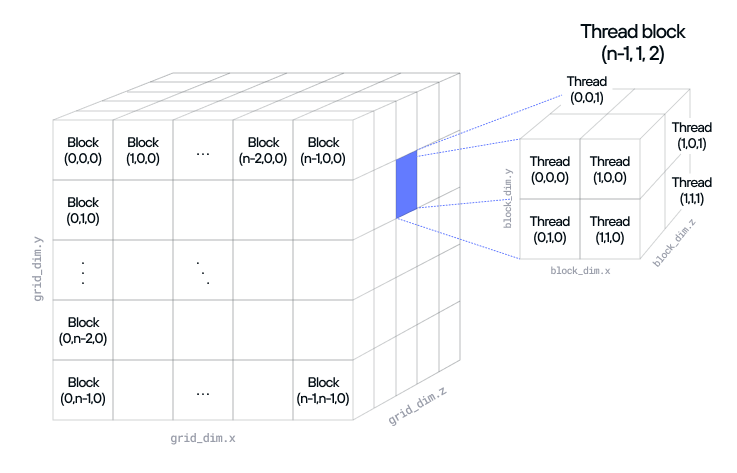
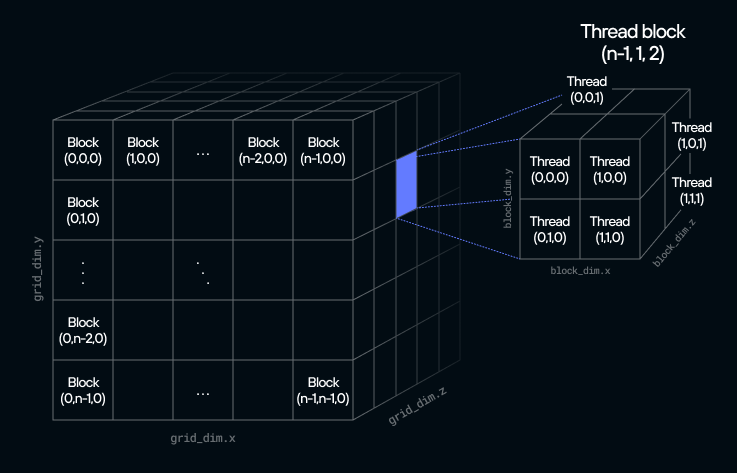
From within a kernel function, you can access the grid and thread block dimensions and the assigned thread block and thread indices of the individual threads executing the kernel using the following structures:
| Comptime value | Description |
|---|---|
grid_dim | Dimensions of the grid as x, y, and z values (for example, grid_dim.y). |
block_dim | Dimensions of the thread block as x, y, and z values. |
block_idx | Index of the block within the grid as x, y, and z values. |
thread_idx | Index of the thread within the block as x, y, and z values. |
global_idx | The global offset of the thread as x, y, and z values. That is, global_idx.x = block_dim.x * block_idx.x + thread_idx.x, global_idx.y = block_dim.y * block_idx.y + thread_idx.y, and global_idx.z = block_dim.z * block_idx.z + thread_idx.z. |
The following example shows a kernel function that prints the thread block index, thread index, and global index for each thread.
from std.sys import has_accelerator

from max.gpu.host import DeviceContext
from std.gpu import block_dim, block_idx, global_idx, thread_idx


def print_threads():
    """Print thread block and thread indices."""

    print(
        block_idx.x,
        block_idx.y,
        block_idx.z,
        thread_idx.x,
        thread_idx.y,
        thread_idx.z,
        global_idx.x,
        global_idx.y,
        global_idx.z,
        block_dim.x * block_idx.x + thread_idx.x,
        block_dim.y * block_idx.y + thread_idx.y,
        block_dim.z * block_idx.z + thread_idx.z,
        sep="\t",
    )


def main() raises:
    comptime if not has_accelerator():
        print("No compatible GPU found")
    else:
        # Initialize GPU context for device 0 (default GPU device).
        ctx = DeviceContext()

        print("block_idx\t\tthread_idx\t\tglobal_idx\t\tcalculated global_idx")
        print("x\ty\tz", "x\ty\tz", "x\ty\tz", "x\ty\tz", sep="\t")
        print("-" * 20, "-" * 20, "-" * 20, "-" * 20, sep="\t")
        ctx.enqueue_function[print_threads](
            grid_dim=(2, 2, 1),  # 2x2x1 blocks per grid
            block_dim=(4, 4, 2),  # 4x4x2 threads per block
        )

        ctx.synchronize()
        print("Done")
This example produces output similar to the following (with the output order indeterminate because of the concurrent execution of multiple threads):
block_idx		thread_idx		global_idx		calculated global_idx
x	y	z	x	y	z	x	y	z	x	y	z
--------------------	--------------------	--------------------	--------------------
0	1	0	0	0	0	0	4	0	0	4	0
0	1	0	1	0	0	1	4	0	1	4	0
...
1	1	0	2	3	1	6	7	1	6	7	1
1	1	0	3	3	1	7	7	1	7	7	1
DoneWriting a kernel function
Kernel functions must be non-raising.
Argument values must be of types that conform to the
DevicePassable
trait. Additionally, a kernel function can't have a return value. Instead, you
must write any result of a kernel function to a memory buffer passed in as an
argument. The next two sections,
Passing data between CPU and GPU and
DeviceBuffer and HostBuffer go into more
detail on how to pass values to a kernel function and get back results.
As discussed in GPU execution model, when the GPU executes a kernel, it assigns the grid's thread blocks to various streaming multiprocessors (SMs) for execution. The SM then divides the thread block into subsets of threads called a warp. The size of a warp depends on the GPU architecture, but most modern GPUs currently use a warp size of 32 or 64 threads.
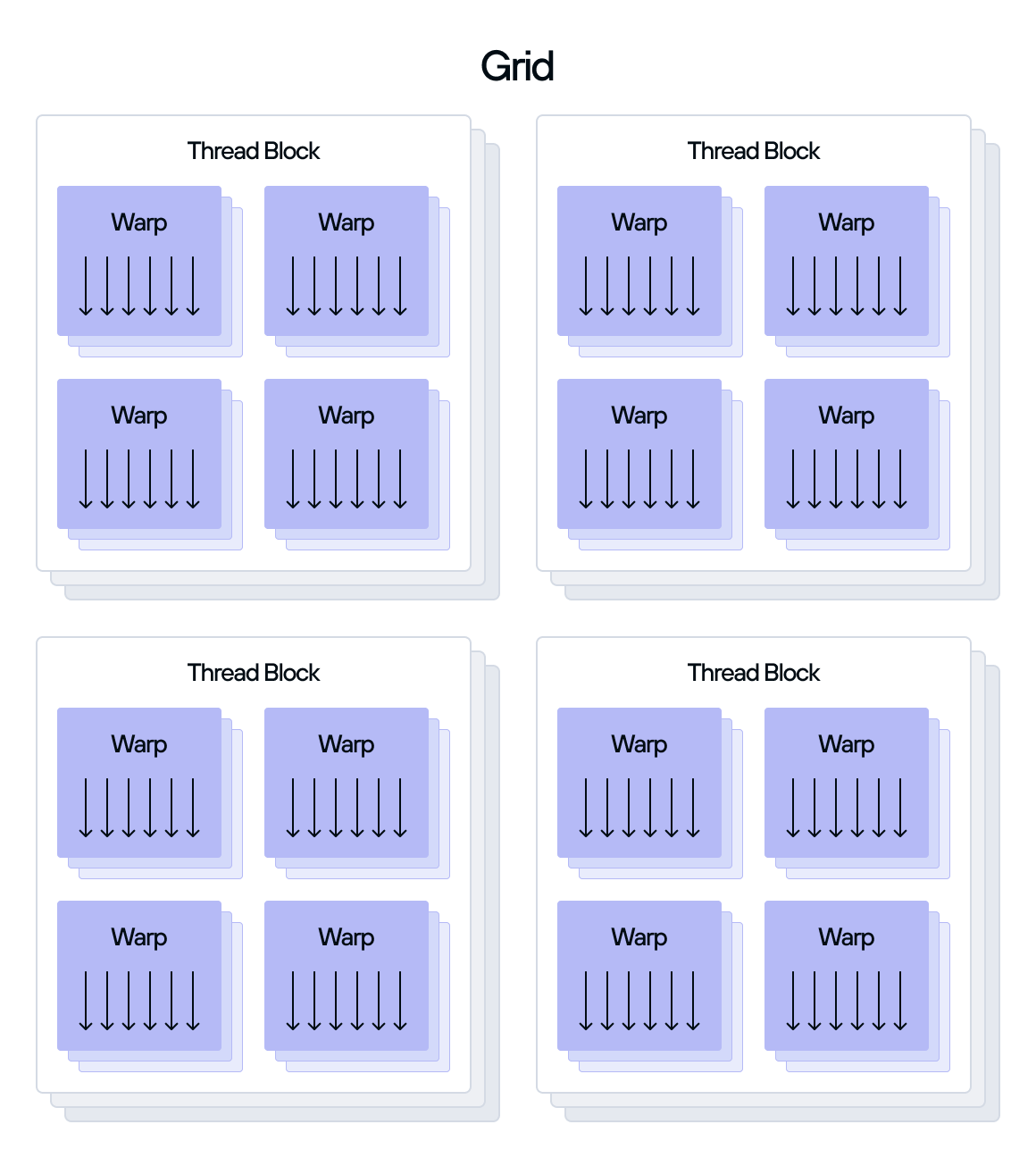
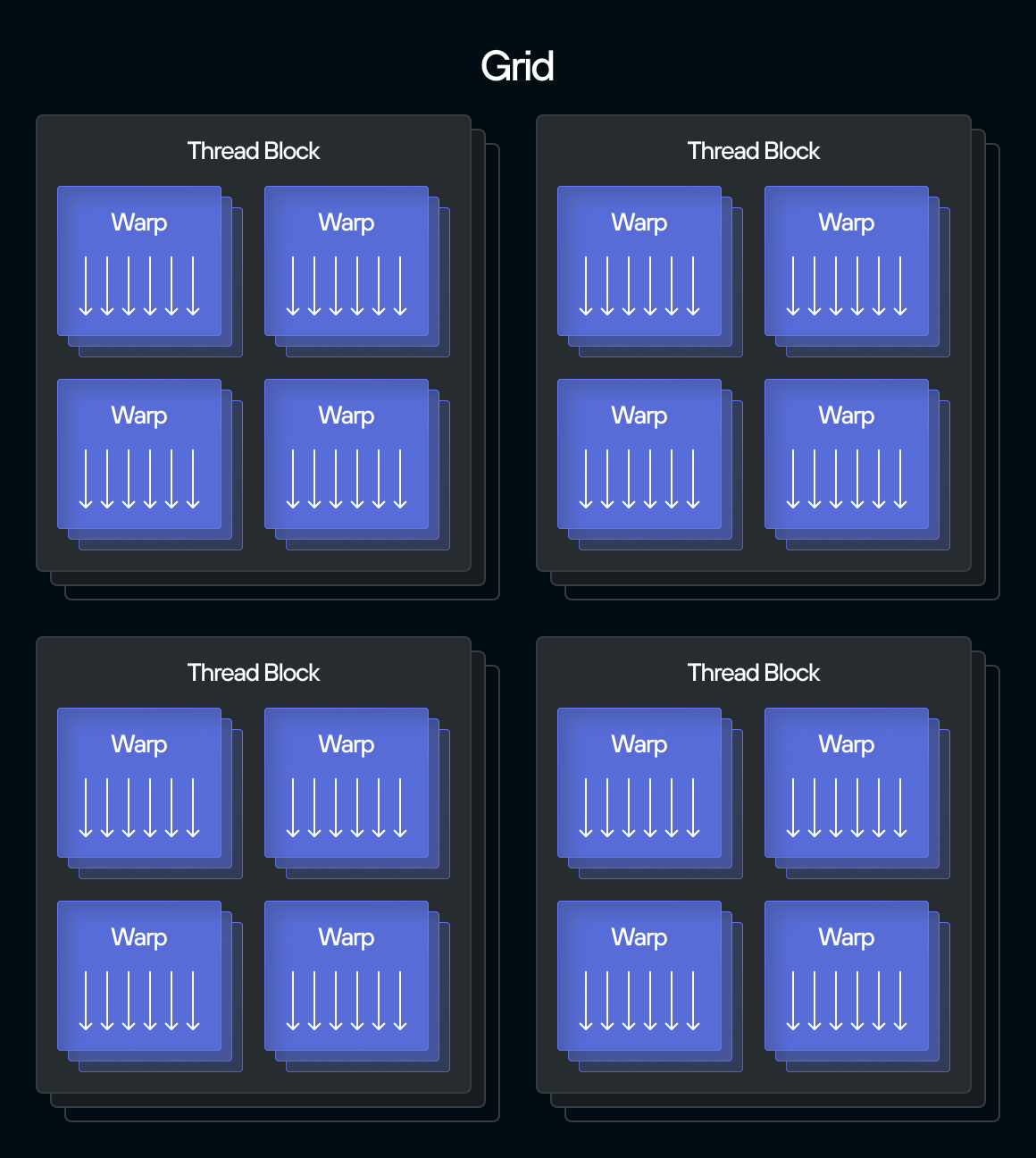
If a thread block contains a number of threads not evenly divisible by the warp size, the SM creates a partially filled final warp that still consumes the full warp's resources. For example, if a thread block has 100 threads and the warp size is 32, the SM creates:
- 3 full warps of 32 threads each (96 threads total).
- 1 partial warp with only 4 active threads but still occupying a full warp's worth of resources (32 thread slots).
Because of this execution model, you must ensure that the threads in your kernel don't attempt to access out-of-bounds data. Otherwise, your kernel might crash or produce incorrect results. For example, if you pass a 2,000-element vector to a kernel that you execute with single-dimension thread blocks of 512 threads each, and each thread is responsible for processing one element, your kernel could perform a boundary check like this to ensure that it doesn't attempt to process out-of-bounds elements:
from std.gpu import global_idx

def process_vector(vector: UnsafePointer[Float32, MutAnyOrigin], size: Int32):
    if global_idx.x < Int(size):
        # Process vector[global_idx.x] in some way
Passing data between CPU and GPU
All values passed to a kernel function must be of types that conform to the
DevicePassable
trait. The trait declares a
comptime member
named device_type that maps the type as used on the CPU host to a
corresponding type used on the GPU device.
As an example,
DeviceBuffer is a
host-side representation of a buffer located in the GPU's global memory space.
But it defines its device_type member as UnsafePointer, so the data
represented by a DeviceBuffer is actually passed to the kernel function as a
value of type
UnsafePointer.
The next section,
DeviceBuffer and HostBuffer, describes in
more detail how to allocate memory buffers on the host and device and to
exchange blocks of data between host and device.
The following table lists the most commonly used types in the Mojo libraries
that conform to the DevicePassable trait.
| Host type | Device Type | Description |
|---|---|---|
SIMD[dtype, width] | SIMD[dtype, width] | Small vector backed by a hardware vector element |
DeviceBuffer[dtype] | UnsafePointer[SIMD[dtype, 1]] | Memory buffer of dtype values |
TileTensor | TileTensor | A powerful abstraction for multi-dimensional data. See Using TileTensor. |
DeviceBuffer and HostBuffer
This section describes how to use DeviceBuffer and HostBuffer to allocate
memory on the device and host respectively, and to copy data between device and
host memory.
Creating a DeviceBuffer
The
DeviceBuffer
type represents a block of device memory associated with a particular
DeviceContext. Specifically, the buffer is located in the device's
global memory space. As such, the buffer is accessible by all threads of all
kernel functions executed by the DeviceContext.
As discussed in Passing data between CPU and
GPU, DeviceBuffer is the type used by the
host to allocate the buffer and to copy data between the host and device.
But when you pass a DeviceBuffer to a kernel function, the argument received
by the function is of type UnsafePointer. Attempting to use the DeviceBuffer
type directly from within a kernel function results in an error.
The
DeviceContext.enqueue_create_buffer()
method creates a DeviceBuffer associated with that DeviceContext. It accepts
the data type as a compile-time
DType parameter and the
size of the buffer as a run-time argument. So to create a buffer for 1,024
Float32 values, you
would execute:
device_buffer = ctx.enqueue_create_buffer[DType.float32](1024)As the method name implies, this method is asynchronous and enqueues the
operation on the DeviceContext's associated stream of queued
operations.
Creating a HostBuffer
The
HostBuffer
type is analogous to DeviceBuffer, but represents a block of host memory
associated with a particular DeviceContext. It supports methods for
transferring data between host and device memory, as well as a basic set of
methods for accessing data elements by index and for printing the buffer.
The
DeviceContext.enqueue_create_host_buffer()
method accepts the data type as a compile-time
DType parameter and the
size of the buffer as a run-time argument and returns a HostBuffer. As with
all DeviceContext methods whose name starts with enqueue_, the method is
asynchronous and returns immediately, adding the operation to the queue to be
executed by the DeviceContext. Therefore, you need to call the synchronize()
method to ensure that the operation has completed before you write to or read
from the HostBuffer object.
device_buffer = ctx.enqueue_create_host_buffer[DType.float32](1024)

# Synchronize to wait until buffer is created before attempting to write to it
ctx.synchronize()

# Now it's safe to write to the buffer
for i in range(1024):
    device_buffer[i] = Float32(i * i)
Copying data between host and device memory
The
enqueue_copy()
method is overloaded to support copying from host to device, device to host, or
even device to device for systems that have multiple GPUs. Typically, you'll use
it to copy data that you've staged in a HostBuffer to a DeviceBuffer before
executing a kernel, and then from a DeviceBuffer to a HostBuffer to retrieve
the results of kernel execution. The scalar_add.mojo example in
GPU programming model shows this pattern in action. In
it, the kernel function does an in-place modification of the buffer it receives
as an argument and then reuses the original HostBuffer to copy the results
back from the device. However, you can allocate a separate DeviceBuffer and
HostBuffer for the result of a kernel function if you want to retain the
original data.
In addition to copying data between a HostBuffer to a DeviceBuffer, you can
use an
UnsafePointer
as the source or destination of a copy. However, the UnsafePointer must
reference host memory for this operation. Attempting to use an UnsafePointer
referencing device memory results in an error. For example, this is useful if
you have data already staged in a data structure on the host that can expose the
data through an UnsafePointer. In that case you would not need to copy the
data from the data structure to a HostBuffer before copying it to the
DeviceBuffer.
Both DeviceBuffer and HostBuffer also include
enqueue_copy_to()
and
enqueue_copy_from()
methods. These are simply convenience methods that call the enqueue_copy()
method on their corresponding DeviceContext. For example, the following two
method calls are interchangeable:
ctx.enqueue_copy(src_buf=host_buffer, dst_buf=device_buffer)

# Equivalent to:
host_buffer.enqueue_copy_to(dst=device_buffer)
Finally, as a convenience for testing or prototyping, you can use the
DeviceBuffer.map_to_host()
method to create a host-accessible view of the device buffer's contents. This
returns HostBuffer as a
context manager
that contains a copy of the data from the corresponding DeviceBuffer.
Additionally, any modifications that you make to the HostBuffer are
automatically copied back to the DeviceBuffer when the with statement exits.
For example:
ctx = DeviceContext()
length = 1024

input_device = ctx.enqueue_create_buffer[DType.float32](length)

# Initialize the input

with input_device.map_to_host() as input_host:
    for i in range(length):
        input_host[i] = Float32(i)
However, you should not use this in most production code because of the bidirectional copies and synchronization. The example above is equivalent to:
ctx = DeviceContext()
length = 1024

input_device = ctx.enqueue_create_buffer[DType.float32](length)
input_host = ctx.enqueue_create_host_buffer[DType.float32](length)

input_device.enqueue_copy_to(input_host)
ctx.synchronize()

for i in range(length):
    input_host[i] = Float32(i)

input_host.enqueue_copy_to(input_device)
ctx.synchronize()
Deallocating memory buffers
Both DeviceBuffer and HostBuffer are subject to Mojo's standard ownership
and lifecycle mechanisms. The Mojo compiler analyzes our program to determine
the last point that the owner of or a reference to an object is used and
automatically adds a call to the object's destructor. This means that you don't
explicitly call any method to free the memory represented by a DeviceBuffer or
HostBuffer instance. See the
Ownership and Intro to
value lifecycle sections of the
Mojo Manual for more information on Mojo value ownership and value lifecycle
management, and the Death of a
value section for a detailed
explanation of object destruction.
Compiling and enqueuing a kernel function for execution
The
compile_function()
method accepts a kernel function as a compile-time
parameter and then compiles it
for the associated DeviceContext. Then you can enqueue the compiled kernel for
execution by passing it to the
enqueue_function()
method. The example in the GPU programming model
demonstrated this pattern:
...
scalar_add_kernel = ctx.compile_function[scalar_add]()

ctx.enqueue_function(
    scalar_add_kernel,
    device_buffer,
    num_elements,
    Float32(20.0),
    grid_dim=1,
    block_dim=num_elements,
)
When using a compiled kernel function like this, you execute it by calling
enqueue_function() with the following arguments in this order:
- The kernel function to execute.
- Any additional arguments specified by the kernel function definition in the order specified by the function.
- The grid dimensions using the
grid_dimkeyword argument. - The thread block dimensions using the
block_dimkeyword argument.
Refer to the Multidimensional grids and thread organization section for more information on grid and thread block dimensions.
The advantage of compiling the kernel as a separate step is that you can execute the same compiled kernel on the same device multiple times. This avoids the overhead of compiling the kernel each time it's executed.
If your application needs to execute a kernel function only once, you can use an
overloaded version of enqueue_function() that compiles the kernel and
enqueues it in a single step. Therefore, the following is equivalent to the
separate calls to compile_function() and enqueue_function()
shown above (note that the kernel function is provided as a compile-time
parameter in this case):
ctx.enqueue_function[scalar_add](
    device_buffer,
    Int32(num_elements),
    Float32(20.0),
    grid_dim=1,
    block_dim=num_elements,
)